Bounded Supervisory Optimization for Industrial Process Drift
Optify sits above existing PLC, DCS, APC, or MPC systems to identify localized process drift, recommend inspectable trims, and support controlled re-baselining after maintenance.
Edge-resident. Physics-informed. Advisory-first. Built for bounded deployment.
Optimization rarely fails on day one. It fails after the plant changes.
Industrial models often perform well during commissioning. The harder test comes later.
Sensors are replaced. Actuators age. Cleaning changes heat transfer. Air leakage is corrected. Ambient conditions shift. Recipes change. Startup data becomes noisy. Operators intervene.
A model that cannot separate steady-state behavior from transient noise will eventually lose trust.
The question is not whether optimization is possible.
The question is whether optimization remains trustworthy after the plant changes.
A supervisory layer for localized process behavior
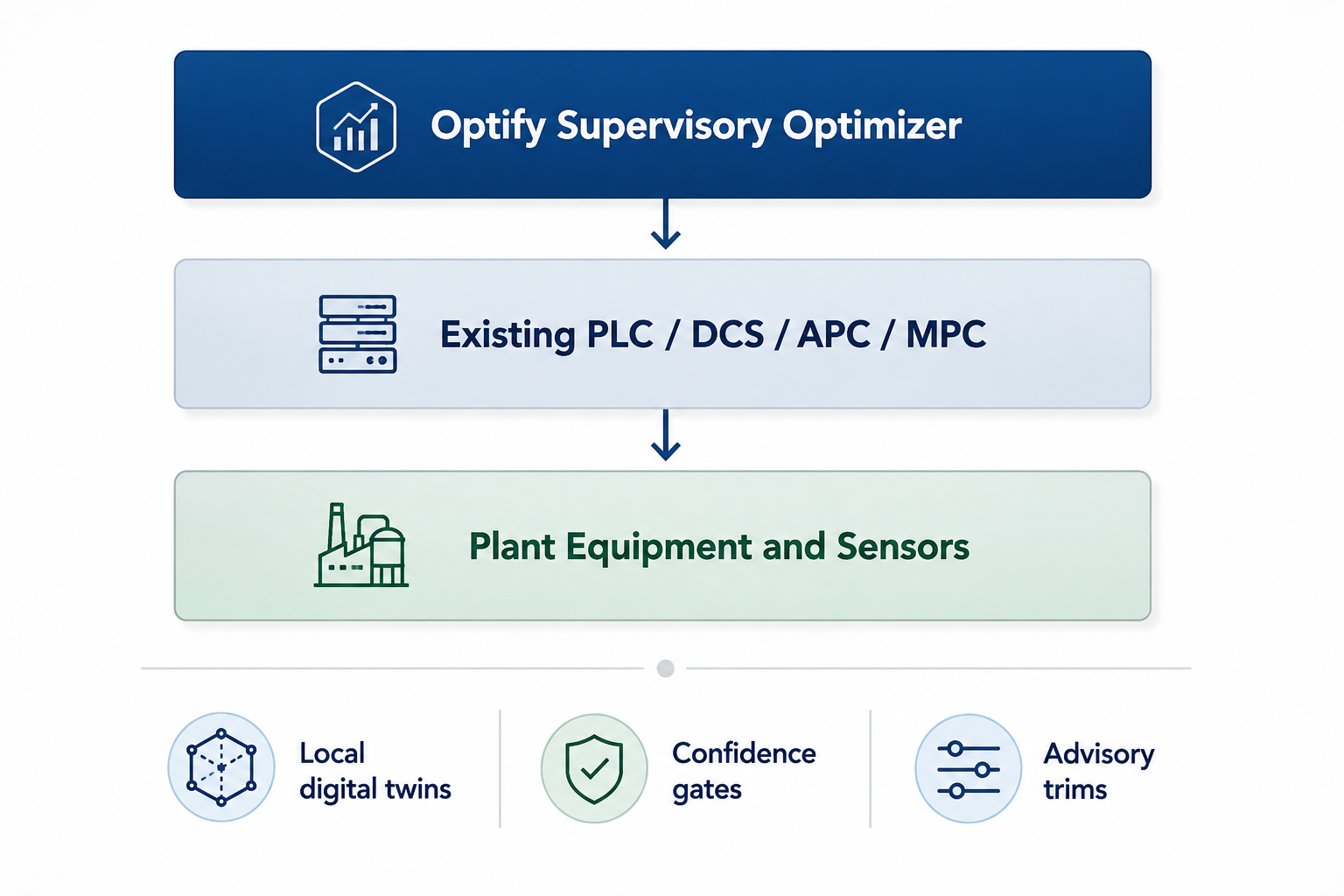
Optify does not attempt to learn the entire factory from raw data. It builds smaller, physics-informed local digital twins around selected high-value process loops and operating zones.
Local Drift Detection
Detects shifts in machine behavior, process response, or operating-zone performance using relevant historical comparison sets.
Inspectable Mathematical Layer
Uses distance-based similarity, local interpolation, and regularized solvers instead of a generic black-box AI model.
Advisory Trim Recommendations
Recommends conservative trims or setpoint support that can remain advisory or be mapped into strict PLC-bounded limits.
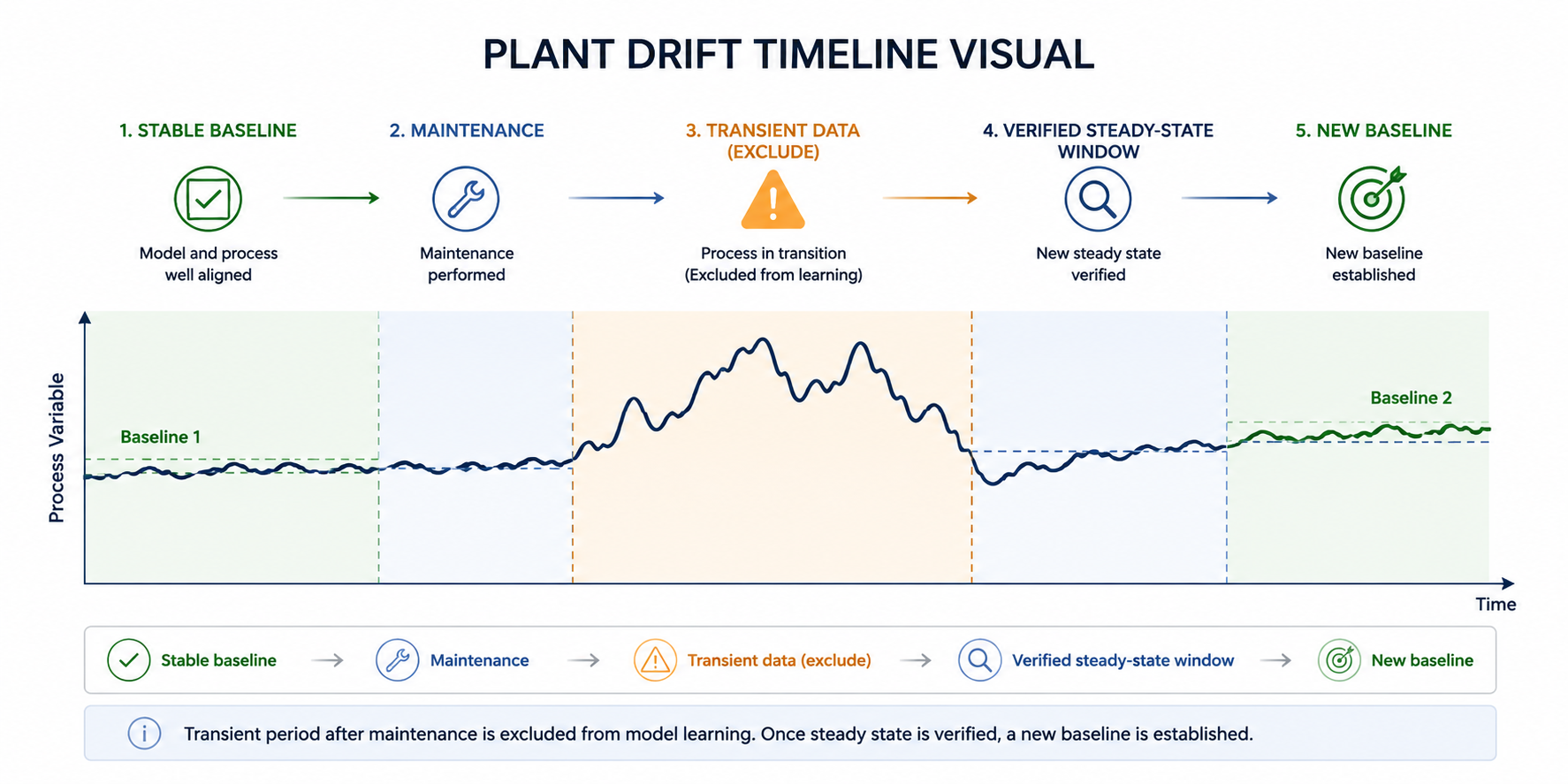
Reset & Learn After Maintenance
Supports controlled re-baselining after maintenance using verified steady-state data, not noisy startup transients.
Designed for contained deployment
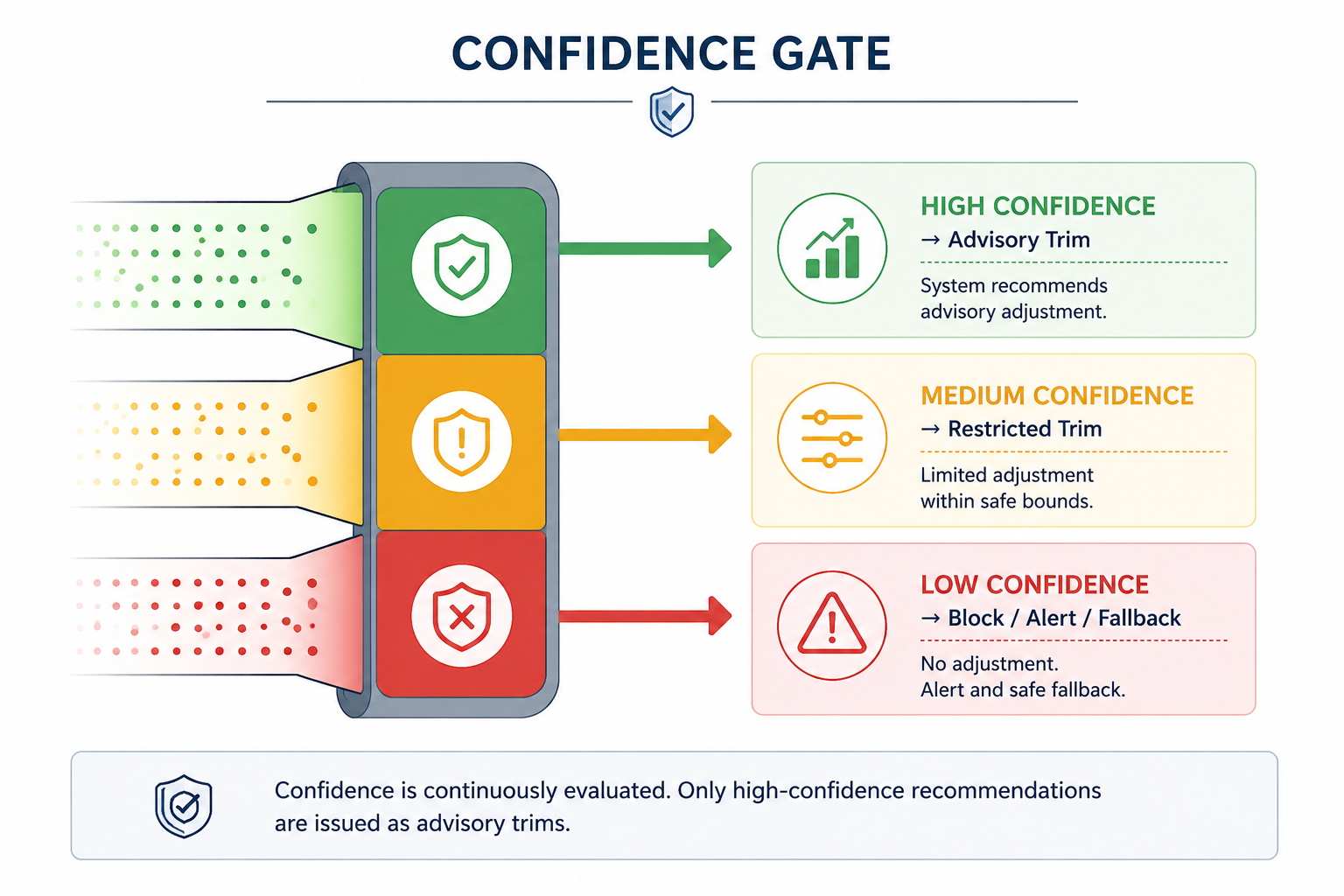
Optify is designed to reduce the risk profile of industrial AI adoption. It can begin in advisory mode, operate within defined process boundaries, and reduce authority when confidence is low.
- Sits above existing automation
- Does not replace PLC or safety logic
- Starts in advisory mode
- Uses engineer-visible thresholds
- Blocks low-confidence recommendations
- Supports fallback to base automation
- Handles maintenance through human-gated re-baselining
- Operates locally at the edge without cloud dependency
Core principle: low confidence reduces authority.
Edge architecture built around process context
Optify's model quality depends on context, not raw data volume. Data is filtered and classified by recipe, operating mode, sensor validity, machine state, maintenance context, and operating zone before it is used for local comparison.
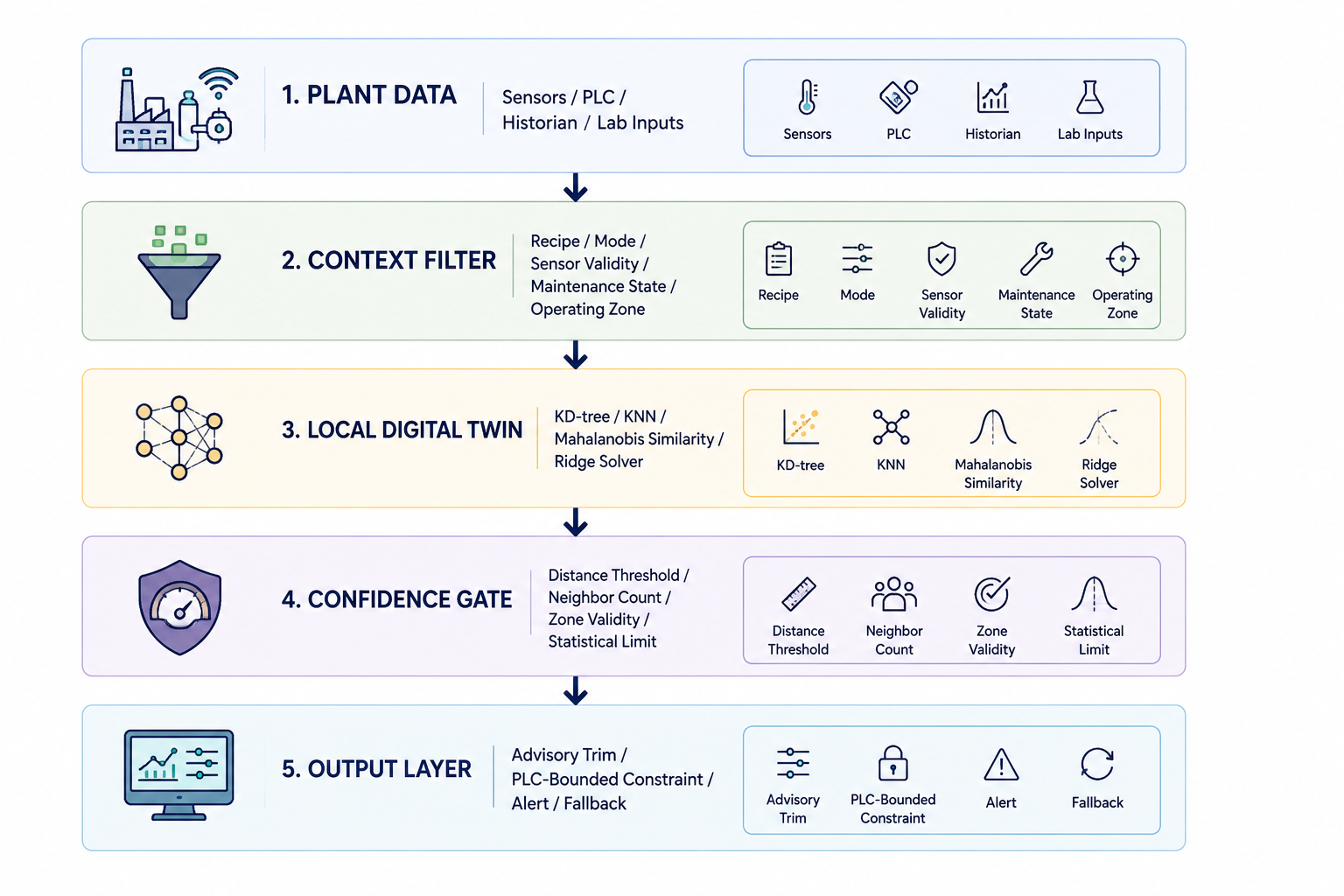
The model does not treat all historical data as equally valid. It compares the current state only against relevant, verified operating conditions.
Reset & Learn: controlled re-baselining after maintenance
Post-maintenance startup data is often chaotic. Lines are being cleared. Temperatures are settling. Operators may intervene more frequently. Mechanical behavior may stabilize only after initial running.
Optify does not blindly self-tune on this data.
After maintenance, affected local models can be placed into advisory or restricted mode. The system continues to observe, but re-baselining is performed only after a verified steady-state learning window is approved.
Maintenance Event Logged
Model Enters Advisory / Restricted Mode
Startup Transients Are Excluded
Engineer Approves Stable Learning Window
New Baseline Compared With Last-Known-Good
The goal is not blind self-learning. The goal is disciplined re-baselining.
Engineer-visible parameters, not magic AI sliders
Optify exposes the important mathematical and control-governance levers to engineers during commissioning and review. Operators see clear recommendations. Engineers can inspect the thresholds behind those recommendations.
| Parameter | Purpose |
|---|---|
| Mahalanobis distance threshold | Rejects dissimilar historical states |
| Minimum neighbor count | Prevents weak interpolation from sparse comparison sets |
| Interpolation radius | Defines the local operating neighborhood |
| Ridge regularization strength | Stabilizes local fitting under noisy or sparse data |
| Confidence floor | Blocks recommendations below accepted certainty |
| Maximum advisory trim | Limits recommendation amplitude |
| Freshness weighting | Controls how recent verified data influences local behavior |
| Zone classification | Separates physically different operating regions |
| Fallback rule | Defines behavior when confidence is low |
These are commissioning and governance parameters, not everyday operator controls.
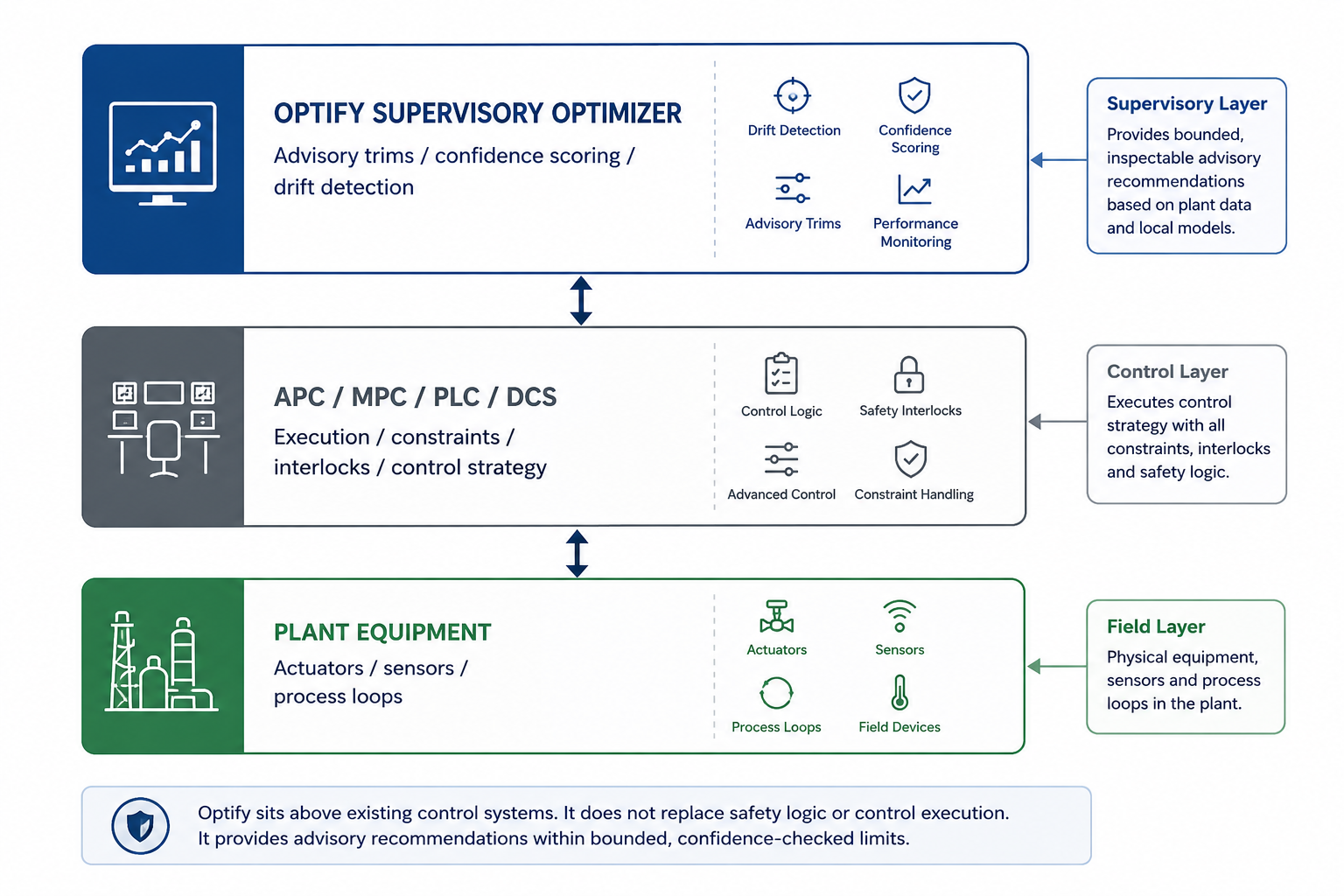
Works with the existing control stack
Optify is not designed to displace the plant's existing PLC, DCS, APC, or MPC systems.
Core automation remains responsible for execution, interlocks, safety, and established control strategy. Optify sits above this foundation as a supervisory optimizer for selected local behaviors affected by drift, maintenance, recipe variation, ambient conditions, or machine-specific response.
This makes Optify a low-conflict addition to the control environment.
Existing automation protects the plant. Optify improves visibility and recommendation quality around it.
Validate on one high-value loop
Optify does not require a plant-wide deployment to prove value. The recommended starting point is one bounded validation on a selected process loop where drift, variation, or manual correction currently affects consistency.
Select One Loop
Identify one high-value process loop with measurable quality, energy, throughput, or consistency impact.
Define Boundaries
Define operating zones, valid data windows, exclusion rules, actuator limits, and fallback behavior.
Build Local Digital Twin
Use verified historical data to build a physics-informed local model around the selected behavior.
Run Advisory Comparison
Compare Optify's recommendations against actual plant outcomes without changing the process.
Review With Engineers
Inspect distance thresholds, neighbor quality, confidence scores, and recommendation logic.
Decide Integration Level
Continue advisory mode, map recommendations into PLC-bounded limits, or stop the validation.
The validation is designed to be reversible, inspectable, and limited in scope.
Start with one loop. Prove the behavior. Then decide.
Optify is built for controlled industrial validation. Select one process loop, define the operating envelope, and test whether bounded local mathematics can improve drift visibility and recommendation quality before deeper integration.
Request an Engineering Validation
Tell us about your process. We'll review the context and respond with the next validation step.